Your developers already use AI to ship faster. Now designers can keep up: point at a screen, say what you want, and your AI agent builds it from your team's real components.
Free, with no account. Look, play and edit in the browser. Agents run in the desktop app.
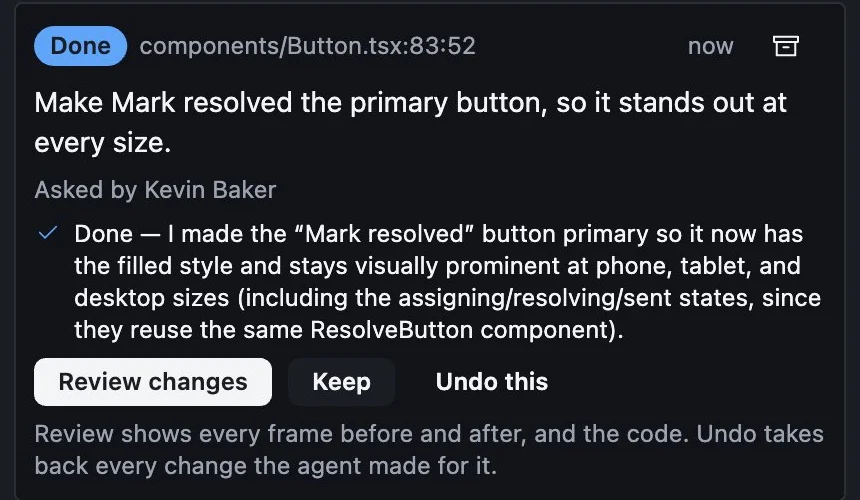
A real request in Mockz. The agent (OpenCode) changed one component, every frame that uses it redrew, and it answered. You keep it or undo it.
How it works
You direct. The agent does the work.
1
Point at it
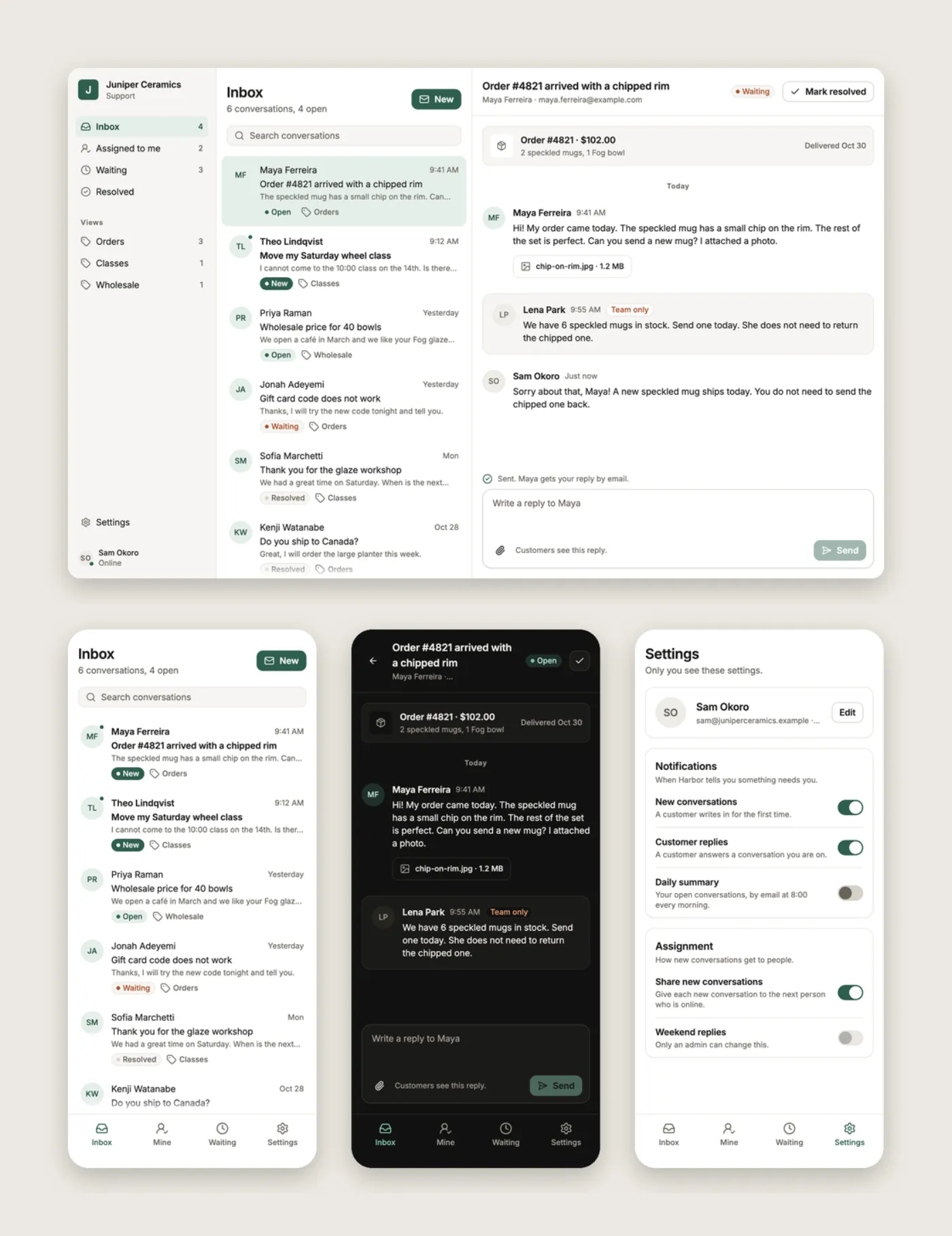
Click any part of any screen. Every screen shows at phone, tablet and desktop size, and Mockz tells you which component drew what you picked.
2
Say what you want
"Make this quieter." "Try it as cards." "Add an empty state." Your agent makes the change and checks it against your theme and accessibility rules.
3
Keep it or undo it
The agent answers under your request. Review every frame before and after, then keep the change or undo it with one click.
Your components
Built from your team's real components.
Mockz designs with the components your team already has, not a kit of ours. The Components page shows each one in every state, where it is used, and whether it is ready for developers.
Every state side by side
Linked to where your code builds it
Inputs set where a component is used
Play
Click through the real thing.
Flows run the screens live. Type in the fields, press the buttons, and the next screen shows what you did. Mockz tells you what to press next, and why a button is still off.
Branching flows and screen states
Phone, tablet and desktop in one click
Slow motion to check transitions
Built on version control
Your designs live in GitHub, next to your code.
Nothing is locked in someone else's cloud. Your team works on designs the way it works on code.
Every saved version is a commit, with who made it and why.
Ideas go in proposals: a branch of their own. When the design is locked, agents work in one too.
Review as pull requests, with pictures of what changed. Comments, notes and statuses travel with the design, and reviewers don't need a license.
For developers
Coding agents build from the design.
Developers connect their own coding agent to Mockz. It reads each screen at every size: layout, spacing, theme tokens, components, flows and the designer's notes. That is the context it needs to build the real thing, in any language and framework.
Every element's size, layout and token
The designer's notes and the team's comments
Checks the built page against the design, frame by frame
What a coding agent reads (mockz_inspect, from the sample)
› Inbox/Conversation at Desktop, 1280×800, light
Its frames: Phone 390×844 (touch), Tablet 768×1024 (touch), Desktop 1280×800
column 232×800 at 0,0 · width 232px · gap 24 · padding 16 12 · bg surface
text "Juniper Ceramics" 156×20 · bodyStrong text
◆ ResolveButton (customer="Maya Ferreira", iconOnly=false)
◆ Button (label="Send", size="small")
…The designer's notes:
On Button "Send": Send stays off until the reply has text.
After Send, the status changes to Waiting until the
customer answers.
Bring your own agent
Works with the agent you already use.
Start an agent from the toolbar of the desktop app, or connect one by hand. You use your own agent and your own account with it. Mockz does not run an AI model.
Claude CodeCodexGemini CLIOpenCodeAny MCP agent
# Connect Claude Code to the desktop app$ claude mcp add --transport http mockz \
http://127.0.0.1:47620/__gesso/mcp
# Or Codex$ codex mcp add mockz \
--url http://127.0.0.1:47620/__gesso/mcp
Try it now
Open a real design in your browser.
Harbor is a sample: a support inbox for a small pottery shop, with four screens, three flows and nineteen components. Open it, play the flows and read its history. Or open any public design repository.
Agents connect in the desktop app. Download it for:
Pricing
Pay once. No subscription.
Looking and reviewing are always free, and so is editing public repos. For private repos, buy a license one time. Every update is free.
Free
$0 USD
For everyone, always
Open, play and review any design you can see on GitHub
Teams pay the same for each person who edits or uses an agent. Viewers are free. Ask for an invoice.
Questions
Questions people ask
Do I need to know how to code?
No. You pick, ask and use the controls, and Mockz or your agent makes the change. Someone on the team sets up the design repository and its components once.
Which agents work with Mockz?
Claude Code, Codex, Gemini CLI and OpenCode start from the toolbar. Cursor, Goose and any other agent that speaks MCP can connect by hand. Agents connect to the desktop app, not the browser version.
Where are my designs kept?
In your own GitHub repository. The desktop app works on a folder on your computer, and the browser version opens and saves to GitHub. Mockz has no server that keeps your designs.
Can I bring my existing designs?
Yes, as a starting point. Import takes a link to a design file, page or frame and writes each frame as a screen. Auto layout, text, fills, borders, icons and pictures come across. Gradients, shadows and instances don't yet.
What do developers get?
Their coding agent connects to Mockz and reads every screen: layout, tokens, components, flows and your notes. It builds in whatever language and framework they use, then checks the built page against the design. On a private repository, each developer whose agent connects needs a license. Develop mode also shows any element as CSS, and a whole screen as React.
Which computers does it run on?
The browser version runs in a current desktop browser. The desktop app runs on Macs with Apple silicon (M1 and later), and on 64-bit Windows and Linux. Intel Macs are not supported.
Do I pay again for updates?
No. A license is a one-time payment, and every future version of Mockz is included. There is nothing to renew.
Who makes Mockz. Mockz is made by Kevin Baker. It is built on Gesso, an open-source UI framework (MIT) he also makes. The latest version is 0.1.0, from 2026-10-28. See the changelog.
Open a real design in ten seconds.
Open the sample in your browser. You don't need an account.
 Mockz